
A lot of people these days have made the move to the Linux operating system or are considering it for its stated advantages of superior performance, stability, security, and privacy. An army of developers contribute to various versions of this open-source system which is agenda-free, flexible, and to some degree, customizable without intrusive features embedded in the Windows and macOS systems peddled by Corporate behemoths. It’s a way to extend the life of an older computer because the operating system requires less resources and is a cleaner, bottom-up build.
Being the curious sort, I decided to spend (a good part of) my Christmas break re-purposing an old Dell laptop loaded with the legacy Windows 10 over 7 cripple-ware installed in order to make it a soaring eagle again with Linux running all my favorite software (er… apps). In the process, I could help the planet by not sending (right away) the laptop to a country in West Africa for rare and precious metal-content recycling using under-age labor in squalid sweatshop facilities, and I could also stop contributing to the legal team, by way of my monthly subscription, for the so-far unindicted vaccine pusher who is still the second largest shareholder of Microsoft. SME, a professional organization and mining industry lobbying group from which I recently resigned, would be proud of this effort because it helps the current Puppetdent and builder of the new East Wing ballroom to conserve “critical minerals” so that Venezuela and too many other countries to be mentioned here can finally be freed, and so that the likeness of the Orange Man can be added to Mt. Rushmore.
A quick internet search assured me that installing Linux is straightforward and robust. Sites abound offering encouragement and help. Like this informative one:
See? It’s got to be easy for this dumb geologist who washed out of a job as a mainframe programmer in the exhilarating area of coal quality in the early ‘80’s. The various versions are even rated like stocks or places to stay on AirBnB; e.g., this excerpt from one of the helpful web sites: “Anyone can use Linux today. Gone are the myths surrounding its steep learning curve (outside of something like Arch) and some excellent distros are available for those who have yet to visit the command-line interface (CLI).” Did you get all that?
Or, “In this article, we will walk you through the entire process—from downloading Ubuntu, installing it, performing initial setup, to troubleshooting common issues. Even beginners can follow along easily, so feel free to use this guide as a resource for getting started.”
Well, of course, I chose Ubuntu and I have to say, the download of the installer file and BalenaEtcher (???) is really easy. It’s for Beginners! You can even install Linux on the same computer as Windows and dual boot. You have the best of everything! I’m a Baby-Boomer and that’s what I want. Everything in one place, all mine, and free.
Still, there are just a few things that would be helpful to know and that I would like to share based on the perspective I have from Days 1 – 3 5 of the easy, intuitive, and seamless installation process. I have reduced these to six basic and fundamental principles of the installation to which follows a diary that gives a sense of the truly transformative nature of the whole process. At CRC, we always try to scope and organize each project for maximum efficiency and cost-effectiveness. Number and bullet lists are just second nature in that process, insurance against any unforeseen hiccups.
Six Steps for Installing Linux
- Download the installer and follow the instructions to prepare a Linux installation USB drive
- Install Ubuntu, the easiest and most intuitive Linux system for beginners
- Inform all your clients, wife or partner, and family members to stay away from your office for at least 4 days
- Make sure you have enough food, water, and medications of choice to last for at least 4 days, and better, a week
- Give away all your firearms or participate in the local sheriff’s department weapons drop-off program–it’s not illegal to shoot your laptop but in doing so there could be very unfortunate collateral damage
- Back up everything on your Windows machine in case the installation fails, making an image of the operating system and your disk…and a rescue boot disk.
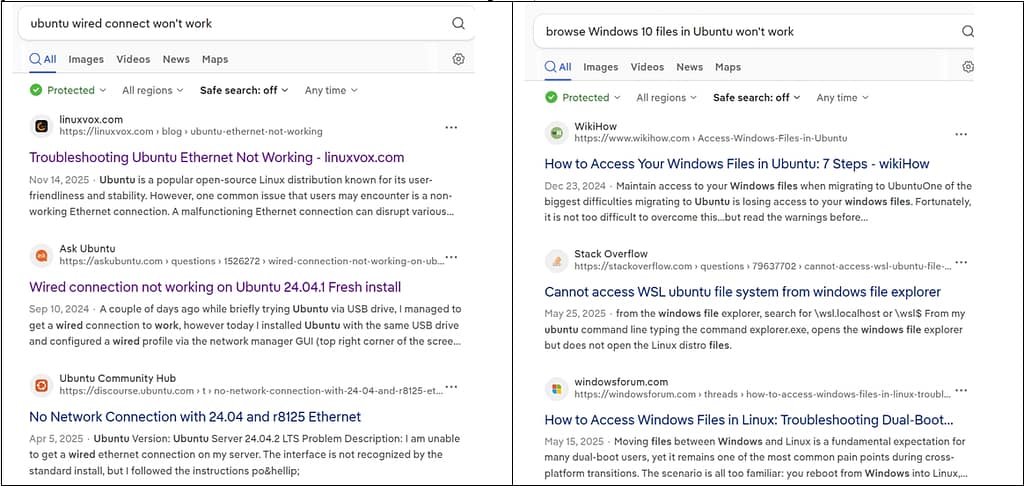
Oops, sorry, Step 6 should have been Step 1. And that’s about how the whole thing went. There was anxious waiting, (almost) tears, moments of great elation followed by deep valleys of despair, rage, and then, calm and the serenity of the Season. In order that you don’t encounter any difficulties at all in your adoption of Linux, the open-source, private and secure operating system, here follows a short re-cap of the process. And if you do have the odd question or two, don’t forget to add this suffix to your query in your browser search bar: “…won’t work”. Examples:
Day 1
Excited to begin! Moved all non-essential file clutter off my C drive to the open-source, robust and private Freenas network backup drives in order to free up space. Created an image of my hard drive, will do the rescue boot disk some other time. Everything is going to be fine. Start install with preview–looks good. Proceed to install. What’s all this stuff about partitions and how come I don’t see the option to do a side-by-side installation with Windows on my screen? It was showing on all those websites with the helpful tutorials and a couple of YouTube videos (nice background music on some of them). All I have to do is shrink my current partition and create a new one. Oh, it won’t actually let me do that. Hmm, looks like I’m going to have to learn about disk partitions and do some stuff in Windows. Reading up on that. New set of helpful tutorials. I have to download some 3rd party software to help me with that. Ok, that’s enough for today. Tomorrow will be better.
Day 2
Dawn
Downloaded the 3rd party software to fix my Windows partitions. Turned out the download was free but then I have to buy something. Two or three other tries, finally found some freeware (resizer-free). Ran the freeware and now I have a new partition. Yay! I can start the install. But wait, seems I should clean up the Windows stuff and run some disk management utilities first. Ok, all done after very slow Windows de-fragment, disk cleanup, etc. Gave me time to get some exercise and reflect on how I won’t have to “Wait for Windows” anymore! Start the install. Ha! This time I see the option to do the dual install. The disk structure seems a little strange but it’s all good and I go ahead and install Obuntu. Yay! I have Ubuntu. Looks good. Lots of apps installed and it seems pretty good.
The Day Wears On…
Guess I’ll restart and go over to Windows. Hey, wait a minute! Nothing’s happening. Black screen. Shut down. Try to get to the boot order menu. Many attempts. I go get the mail while waiting for Windows to load. Just an Alumni newsletter and request for more money from me. I’m getting ticked off. I did the stupid disk cleanup, repair, partition and all that song and dance and the software isn’t even loading. Start pounding on the F2 key and finally Ctl+Alt+Del. Yes! Ubuntu is back but no GRUB screen. GRUB is where you get to pick which operating system you want to boot. So it’s Ubuntu-only for Day 2. The wireless connection works but the network wired connection is somebody else’s, not mine. I can’t see my Windows file folders. Slam lid. Day 2.
Day 3 Christmas Eve
AM Wakeup
I’m researching how to get that ugly black and white GRUB menu to show up so I can boot Windows someday again. Is my Windows installation corrupted? Do I need to work on how to restore the remnants of my clunky, but once-functioning hard drive? Near despair and self-incrimination for even considering this project. The trash can under my desk beckons. The holstered 9 mm hanging on a hook nearby comes to mind as a means to finally put that old miserable Windows 7 laptop out of its misery. I’m just going to get a lump of coal in my stocking tomorrow morning. Then, one of the tutorials suggested if nothing else works, install Ubuntu again. Ok, why not try that, right? Wow, that actually worked! I get the GRUB, I have Ubuntu. I can go to Windows. Back to GRUB (this is not instantaneous and I am on my 2nd carafe of coffee already with all of these re-starts. Soon, wife will be up and this activity is kind of weird for a Christmas Eve so I may have to put off FINAL INSTALLATION until after Christmas). But, it’s going well.
Mid-Morning
Wait! The wired network connection doesn’t work. Gotta fix that. This needs to work in airplane mode. I can’t have all that wireless radiation in my face all day. The fix requires more research on several web pages, downloading additional add-ons for Ubuntu, going to the Terminal which looks a lot like an old DOS screen designed by the team under Bill Pedo’s auspices in the 1980’s and executing some commands, and Voila! It works. I have a wired connection using a non-fixed I.P. address with automatic DHCP. Oh, but I can’t see my Windows folders and files. A new research topic! Yay! I thought this was going to be TOO easy. I don’t mind spending most of Christmas Eve typing in nonsensical commands into the Terminal (e.g., sudo umount /mnt/ntfsdrive sudo mount -a). But yes, it finally works and the NTFS partition is finally “mounted”.
Late Afternoon
As of this afternoon, I have my new Chinese office suite clone, WPS, installed with no A.I. and the desired no internet connection, and can open any file on the whole danged network. It’s time for an egg-nog and wrap a couple of presents. On returning, I shut down and start up just to check things. If you don’t want to boot to Ubuntu, you have to spend 90 seconds or so staring at your completely black screen until this menu with tiny font size pops up in a corner. You just have a few seconds to arrow down to the selection of Windows, otherwise you will be in Ubuntu. I can see that this song-and-dance could get a little tiring after a few hundred times. “Waiting for the computer to boot” is a special moment in our modern living. It can be that moment you go fetch a cold drink, go for a walk, fIip a burger, or impatiently drum fingers. NOT having to staring at a blank screen is one of the reasons WHY I am installing Linux. So I never have to put up with that sort of thing again. Anyway, I must have looked away because Linux Ubuntu loaded instead. Now, it appears there is still a connection to the Windows file folders but, … I don’t have a wired network connection…again. That’s it. I’m done for today. Merry Christmas!
Day 4
It’s Christmas. The laptop and scattered pieces of scratch paper, USB drives, a screwdriver and various computer parts are scattered around the conference table, lurking, beckoning, waiting for me until the holiday is over. I pass by the table several times during the day but I don’t touch the keyboard. Manifest willpower.
Day 5
Dawn
A search is made for the pages that showed me how to overcome the wired connection issues. Apparently, it’s Windows fault that Linux Ubuntu has occasional problems with this otherwise seamless installation so far (!!!!). What did I do with those pages? Cleverly, I checked the box to destroy my browsing history when closing my web browser for good security practice, so now I can’t remember where I saw the fix that worked on Day 3, or was it Day 2? Finally, I find a solution, which will require several trips to the Terminal typing in nonsense commands until re-bootings, shutdowns, and testing bring the connection up. It is something about the fstab. I can’t wait to use all of this new jargon in conversation… but not around anyone who could possibly obtain guardianship and lock me up for my own protection. Anyway, maybe this time I’ll bookmark the helpful page. Time for an egg-nog latte before I tackle this.
Early Afternoon
I sit down to the old laptop and let it boot to Ubuntu. I start checking things out, bring up the dreaded Terminal and get ready to start punching in more hieroglyphics, hoping for a miracle. I check the network, and behold, the wired connection works. Has there been some divine intervention? I don’t need to troubleshoot anymore.
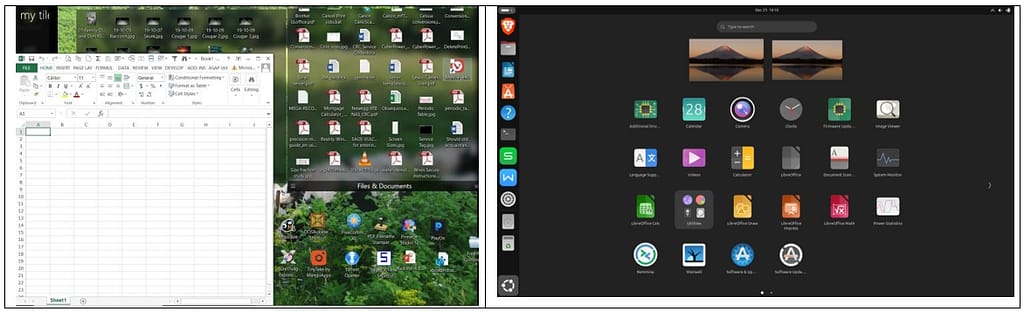
And here’s the result! A computer with two operating systems, each fully stocked with helpful software. I even have a wired connection, can access my Windows file folders and (some of) my network folders. I have no idea why it works today but it didn’t work on Day 3. Was it because of Christmas? Ubuntu boot time is ~2 minutes compared to 10 minutes for my Windows 10 system.
Windows Ubuntu Linux
So, you see? It’s pretty easy if you follow the steps and really want to get off the grid and use software without paying a subscription to a company that, with its office, enterprise, and surveillance software, enables the genocides, regime change operations, and the police state, while saving the planet by re-purposing a laptop chucky-jam full of critical materials that are necessary for the “green” transition. No A.I. needed. As long as you’re in good health, have a strong support team, you’re not likely to hurt yourself in the process, and you have absolutely nothing else better to do, or read, and there’s no snow on the ski hill anyway, why not try Ubuntu Linux, the easy-to-install, intuitive, private and secure alternative operating system?
Don, I loved this blog post. You got a few honest chuckles out of me. Back to work!
Hi Teresa,
If I can get a chuckle from someone then I have accomplished something today. Thanks for your comment and stay tuned for more exciting and informative posts to come when I have absolutely nothing else to to do!
Best regards,
Don